


Someone is staring at a blank calendar right now with a hybrid policy sitting open in another tab. The policy says three days in the office, two remote. It does not say which three. It does not say how to run a Tuesday that starts with a client call from home and ends with a team sync in a meeting room nobody has booked yet. Having a hybrid arrangement and having a hybrid schedule are different problems, and most people learn the difference the hard way. This article walks you through that distinction.
As a workspace provider operating across London, Berlin, Amsterdam, and more, Mindspace has watched a lot of teams build their hybrid schedules across the flexible model. What follows is what works, what quietly fails, and how to design a week that does the job.

What Is a Hybrid Work Schedule?
A hybrid work schedule is a structured split between working remotely and working from a physical space. Some days at home, some days in the office, and a predictable rhythm between the two. That is different from fully remote, where the office is optional or absent, and different from fully in-office, where remote days are a rule exception.
The schedule gets decided in one of three ways. Company-directed, where leadership sets the in-office days for everyone. Manager-directed, where team leads pick the rhythm that fits their work. Employee-chosen, where each person decides based on what they are doing that week. Each produces a different workplace, and each has trade-offs that show up later. The goal? Pick the framing deliberately rather than inheriting it by accident.

Types of Hybrid Work Schedules
A hybrid work schedule covers a wider range of arrangements than the phrase suggests. Picking the wrong label for what your team does is where the confusion starts, because the policy ends up describing a different company than the one showing up on Tuesday morning.
Fixed Hybrid, The 3:2 Model
Everyone is in on Tuesday, Wednesday, and Thursday. Monday and Friday are remote. Set days, set pattern, and everyone knows where they stand. This is the most common setup, and its true benefit is that it is predictable. The real value comes from knowing what to expect, not the exact details of the split. Visibility into office attendance allows for better planning and real-time collaboration. It ensures that when you book a meeting room, you aren’t just sending invites to people working from home. The 3:2 fits companies that support collaborative work, keeping the in-office days on schedule, and maintaining consistency across the team.
Flexible, Employee-Choice Model
The flexible, employee-choice model means employees decide where they work based on the tasks, kind of work to be done, and personal mood. Heads-down writing at home. Workshop with the design team in the office. Pitch rehearsal in a booked meeting room. Airbnb’s “Live and Work Anywhere” policy is an example of this model, and so is Spotify’s “Work From Anywhere,” in force since February 2021. Remote-friendly work offers benefits like autonomy and a hiring edge over strict competitors, but it carries a coordination risk. Without a set rhythm, the office becomes unpredictable, and meetings default to video, even when most people are present. This way, the office slowly loses the value and people default to WFH and online meetings. The model works best with a strong async culture and clear written expectations about when in-person presence is actually required.
Manager-Directed Model
Team leads set the rhythm based on what their team does, rather than a blanket company policy. An engineering team running a sprint cycle might anchor Wednesdays as in-person. A sales team with client-facing work might pick Tuesday and Thursday. The main challenge is consistency across the wider company. When one team is in on Wednesdays and another on Fridays, cross-team collaboration gets harder, and the office feels empty on any given day. This works well inside a team and tests the seams between them.
Alternating Weeks
Teams spend one full week on-site followed by one full week remote. This is ideal for weekly sprints and project-based work, where you can switch between group meetings and focused, individual tasks. This approach fits teams that switch between meeting clients and doing internal work. It feels like a natural workflow instead of an awkward compromise between being in the office or staying home. A week off from the commute is long enough to rest and recharge. A week together is long enough for meaningful conversations to happen.
Why Hybrid Works, and Where It Doesn’t
Hybrid models work when it’s well structured. A poor structure results in the worst of both worlds. The office days demand a commute, but lack enough colleagues to justify the trip. The remote days lack the focus a proper home setup needs. People end up tired in both places and productive in neither. The benefits of hybrid schedules are real, but they only land when the structure supports the model.
When it works, the case is strong. Productivity is the most studied angle. Stanford’s Nicholas Bloom has found that workers on a structured hybrid schedule are about 33 per cent less likely to resign than full-time in-office peers, with no measurable drop in productivity or promotion rates. In-person days are most effective when used for high-impact collaboration like onboarding or whiteboarding. Meeting in person lets you settle in minutes what would take dozens of back-and-forth messages on Slack. Retention improves because people count on flexibility ,when looking for a job, the same way they used to factor in salary. For employers, the benefits include lower rent costs, the ability to hire talent from anywhere, and much happier employees.
We should also be honest about the downsides. One major issue is proximity bias, where employees who are physically in the office get more attention and promotions from managers simply because they are visible, even if remote workers are performing just as well. Managing a hybrid schedule takes more effort. A meeting that used to be simple now requires checking who is in the building and ensuring the room has the right technology for both in-person and remote attendees. Informal mentorship thins out when junior team members are remote on the days seniors are in. None of these is a reason to abandon hybrid, but a motivation to design it with care rather than inherit a default.
How to Structure Your Hybrid Week
Most people plan their weeks the wrong way by letting meetings dictate their schedule and squeezing in actual work whenever they can. Instead, you should design your week based on the tasks you need to accomplish, then decide which days require being in the office.
Match Tasks to Environment
Deep work belongs on remote days. Writing, strategy, code, analysis, anything that needs a long, unbroken block of attention, is better done at home. The office is a hostile environment for those tasks: people interrupt, conversations carry, the energy is built for back-and-forth discussions rather than a predictable flow. Collaboration belongs on office days. Workshops, design reviews, client pitches, onboarding, difficult conversations that benefit from being face-to-face, and the informal hallway catch-ups that quietly carry half the value of physical presence. Time-blocking is the tool that protects both. Mark the deep-work blocks on remote days as sacred. Group the collaborative work into office days so people are actually there when the session happens.
Plan Around Anchor Days
Identify the recurring meetings and collaborative commitments first. The Monday standup that needs everyone in the room. The Wednesday team lunch. The weekly client review. Those set your in-office days. Then align with the rest of your team. A three-day office week where everyone is in on different days is worse than a two-day office week where everyone is in together. Predictability compounds. Over a few months, the team starts using those anchor days well: kicking off projects, making hiring decisions, and having the conversations that were stuck on Slack.
Set Boundaries and Stay Consistent
The structure only works if it holds. Core hours for overlap. Calendar status that reflects where you actually are. An out-of-office for the remote days, if that makes the expectation clearer. The quiet professional signal of showing up when you said you would is worth more than any single policy document. A hybrid schedule built on individual willpower breaks within a quarter. One built on team norms and simple habits holds up for years.
How to Implement Hybrid Work: Best Practices
Implementing hybrid work requires considering team’s rhythm with yours for most optimal outcome. Your own rhythm adjusts easily. A team structure needs deliberate design and ongoing communication. A hybrid policy rolled out badly tends to survive longer than it should while slowly eroding the things it was supposed to improve, especially team morale, trust, and productivity.
Forcing people back to the office rarely works. If you want a hybrid schedule to stick, let the teams help design it. Ask what kind of work each person does best in each environment. Ask which days they need to be together. Combine the answers into a policy that most of the team recognises themselves in.
It is important to maintain written guidelines rather than unwritten expectations. This means clearly defining office days, core working hours, how to show you’re available, and how to handle exceptions without undermining the whole system. If somebody needs to miss an office day, there should be a clear process for it rather than a gradual drift toward everyone missing Tuesdays.
Run the new schedule for a defined trial period, usually three months, then hold a structured retrospective. What worked? What quietly did not? Where did the office feel empty? Where did people struggle to focus remotely?
A healthy retrospective produces one or two changes, not a full rewrite. The goal is a policy that improves over time, not one that gets replaced every quarter.
Choosing the Right Hybrid Model for Your Team
There is no universally correct answer here. The right model depends on variables specific to your team, and those variables change over time. The tips below are your decision-making help. Use the one that fits the team, not the one that sounds better on paper.
Start by mapping the work honestly. Which tasks genuinely need physical co-presence? Which works better remotely? Which are neutral? A design team with heavy whiteboarding leans toward more in-office days. An engineering team doing deep solo work leans toward more remote. A customer-facing sales team lives in a different pattern. Most teams, once they do the mapping exercise properly, find the right ratio falls out of it.
A hybrid plan only works if your office can actually hold your staff and your managers can lead flexible teams. For example, if you have 60 people sharing 40 desks, you must have a formal system to manage who sits where and when. If your managers are new, overwhelmed, or uncomfortable running distributed teams, no schedule design compensates for that. This is where flexible workspace comes in. A hybrid office membership is sized around the desks you actually need on peak days rather than the headcount on your HR system, which removes one of the biggest practical barriers to committing to a proper hybrid structure.
Why Your Workspace Choice Makes or Breaks Your Hybrid Schedule
The workspace itself is an active part of the hybrid equation, not just somewhere to sit on office days. It is the variable that decides whether in-person time is genuinely productive or just an expensive commute. Get the space right, and the schedule works. Get it wrong, and no policy redesign saves it.
Flexible Space for Unpredictable Attendance

Traditional leases assume a full office every day, but hybrid work is unpredictable. Attendance now rises and falls based on the team’s specific goals and timing. Paying for 60 desks when only 35 are filled on your average Wednesday is a quiet, but constant waste. Mindspace’s hybrid office model means you pay for the space you actually use. You can adjust the pool month-to-month. The financial barrier that stops a lot of teams from committing to a proper hybrid structure disappears because the cost structure matches the work pattern rather than fighting it.
Locations That Work Around Your Team
One of the quieter wins of hybrid work is cutting the commute, but that only holds if the office is reachable for everyone. Mindspace operates across London, Berlin, Amsterdam, and a dozen other major cities, with multiple locations in most of them. A member on an All-Access plan can work from the Mindspace nearest their flat on a Tuesday and the one closest to a client on a Thursday. Proximity is a feature to count on. When the office is genuinely convenient, in-person days stop feeling like a concession.
Spaces Designed for the Work That Needs an Office

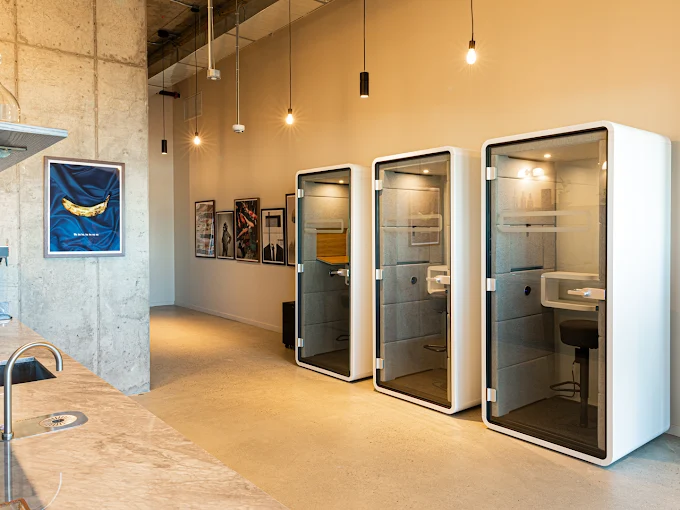
Remote days handle the deep work. Office days have to earn their place, which means the space must support collaboration. Mindspace locations include meeting rooms bookable by the hour, event spaces sized for team sessions and external gatherings, and a mix of private offices for focus with shared lounges for energy. Wellness rooms, phone booths, and properly stocked kitchens are part of the infrastructure. This is the setup that makes in-person time worth the trip rather than a missed opportunity to work from home.
A Community That Makes Showing Up Worth It
The social side of office life is often ignored but vital. Beyond the calendar, value comes from spontaneous kitchen conversations, networking at member events, and the boost you get from working alongside others who are building their own businesses. A home office cannot replicate any of that, whatever your coffee setup looks like. On the days when staying home feels easier, knowing the office has real people in it and real conversations waiting is what tips the balance.
Example Hybrid Work Week Schedule
Here is what a designed hybrid week might look like for a product manager based in London, working out of Mindspace on office days. This is one illustration of the principle, not the only valid arrangement.
Monday, remote. Deep-work day. Three uninterrupted hours on the product roadmap in the morning, a quick Slack check at 11, lunch, and two more hours on the spec document in the afternoon. One internal async update posted by 5 pm. No video calls.
Tuesday, in the office. Anchor day for the team. Standup at 9:30. Design review at 11. Team lunch at 12:30 because that is where the actual team-building happens, not in a scheduled “culture” slot. Afternoon split between ad hoc conversations, a vendor meeting, and catching up with the engineering lead on a build issue that would have taken six messages to solve remotely.
Wednesday, in the office. Second anchor day. Morning client workshop in a booked meeting room. Afternoon retrospective with the team. A 30-minute coffee with a new hire to start the onboarding relationship properly. Leave at 5:30 and actually finish.
Thursday, remote. Second deep-work day. Mornings are product thinking time. Early afternoon, a one-to-one with the lead designer by video. Late afternoon, writing up the retrospective notes and planning next week.
Friday, remote. Lighter day. Tidying up the week, responding to the queue of thoughtful emails, a bit of reading, and a pulse check with the wider team. Friday is the day the structure earns its keep, because you are not commuting when you do not need to.
Conclusion
You can’t just announce hybrid and expect it to work. It requires a mix of good rules, supportive leadership, and an office space that is actually worth the commute. If the workspace is uninspiring or the management is inconsistent, the model will collapse.Explore the full range of workspace solutions, or book a tour at whichever location fits the team.
The Author

You might also like these reads — picked just for you.
Why Flexible Workspaces in San Francisco Make Sense in 2026
San Francisco spent three years as the cautionary tale of American office real estate. That story has turned. Vacancy fell to 30.1% in the second quarter of 2026, down from 33.8% a year earlier, and AI companies signed enough space to make the city the largest single contributor to national office absorption. Rents are climbing […]

Virtual Offices in New York: How Do They Work and What Are the Benefits in 2026?
You want a New York address on your invoices without paying New York rent, and a virtual office gets you exactly that. You rent a real commercial street address at a staffed building, someone on the team there signs for your mail, and you book a meeting room on the days you actually need to […]
Why Williamsburg Is the Answer to Your Team’s New York Commute Issues
If you are weighing where to base a team in New York, the first question is rarely about square footage. It is about the L train. Will your people spend two hours a day getting to work? Will clients agree to come out to Brooklyn? What happens on a Tuesday morning when the L runs […]
